Monday, May 23, 2011

Math that talks about love and sin

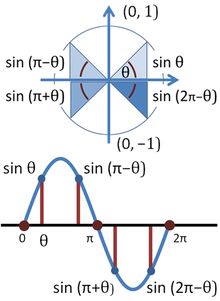
This graph, which is a periodic of sine, came across my mind this morning during the reading bible time (or TWA). At first, I doubted if it is related; But after looking at it for a while, it makes some sense actually. 

Well, look at the graph below and tell me what you see/think, or do you have any verse(s) in your mind when seeing this graph. Welcome to leave any comments and I will share mine later :)


Monday, May 16, 2011

jQuery Plugin ( Recently Published )

I've published several jQuery plugin lately and let's share the links here :)

Simple Auto Complete
http://www.jsclasses.org/package/70-JavaScript-Auto-complete-input-text-from-data-in-the-page.html
This  jQuery plug-in can auto-complete input text from data in the page. It can auto-complete the text entered in text input with text entries by searching in another given elements of the page. The search results can be cached to accelerate future searches.

Basic Slideshow
http://www.jsclasses.org/package/36-JavaScript-jQuery-plugin-to-present-a-slide-show-of-images.html
This object is a jQuery plugin for presenting a slide show of images. It can present a slide show made of images already present in the current Web page within given elements. The slide show image caption text is retrieved from a data attribute of each image. The page element where the slide show images will appear is also configurable. 

Flash Messages 
http://www.jsclasses.org/package/35-JavaScript-Flash-page-elements-a-number-of-times.html
This object is a jQuery plug-in that can be used to Flash page elements a number of times. It can make a given page elements appear and disappear a given number of times. The period of time during which the elements show up if configurable.

Install Compass and Sass in Ubuntu 11.04

Here is a tutorial on setting up your environment to use compass and sass in Ubuntu 11.04 ( should be the same as previous version )

1) Install Ruby
sudo apt-get install ruby-full

2) Install Gem
sudo apt-get install rubygems1.8

3) Install Rails, sqlite3 ( optional, but usually I install that as well )
sudo gem install rails
sudo gem install sqlite3

Try to run this to make your system up-to-date
sudo gem update --system  

4) Install Compass
sudo gem install compass

5) Install Sass
sudo gem install sass

6) Create your first project
(If you want to use normal css syntax, scss)
compass create <myproject>

(If you want to use sass syntax)
compass create <myproject> --syntax sass

How to create your first project
  1. cd /path/to/projects_folder
  2. compass create my_test_project
  3. compass watch my_test_project
Now you can open your favorite IDE, and look into the just created "my_test_project".  You will see a bunch of files are created.  By default, the "sass" folder is the place for holding the sass files, while the "stylesheets" folder is the place for the generated css files.  And you can configure those by changing the  "config.rb" if you will.

Some "extensions" that you may want to install after you setup your project
  • (CSS3 PIE)  compass install  compass/pie

Some "gems" you may be interested 

For more information on Compass and Sass, please visit the official documentation - http://compass-style.org/install/ and http://sass-lang.com/.

Tuesday, May 10, 2011

IE9 Compatibility Feature

This post partially is coming from an email I've received earlier, but since it is useful, so I post it here.

http://blogs.msdn.com/b/ie/archive/2010/06/16/ie-s-compatibility-features-for-site-developers.aspx
  • IE9 = Browser Mode IE9 + Document mode IE9 Standards
    • Default for the browser
  • IE8 ~= Browser Mode IE8 + Document mode IE8 Standards
    • Approximates IE8
  • IE7 ~= Browser Mode IE7 + Document mode IE7 Standards
    • Approximates IE7
  • Any other combination is unsupported because it doesn’t approximate a supported browser.
  • We’re specifically setting the X-UA-Compatible Meta tag to force the browser to render in IE9 unless someone has used the developer tools override. There’s nothing we can do if someone has chosen to override with the developer tools.

If you are interested in knowing more about how IE9 is determining its Document Mode (underly engine), here is the graph for it.


If you want to run multiple different version of IE from different platform ( like IE in Window Vista and XP ) all in your local machine. You can try the Windows Virtual PC VHDs.

Thursday, April 28, 2011

Another Post about SEO

This post aims at giving you (the viewer) some important keywords about SEO, in which you can search further for those particular topics if you are interested.  

  1. Semantic HTML
    • make sure you have valid HTML
    • tags have weight, for example, <h1> tag is weight more than <h3> and <b> weights more than normal text
  2. Importance of Naming (How search engine knows your page quality, here is a good blog about naming - SEO: Using Descriptive, Creative & Efficient Titles)
    • Domain
    • URL
    • Page Title
    • Filename
    • alt for image
    • title for anchor
    • linked text needs to be meaningful, or just use title for link
    • label your form
    • categories your html is good - use fieldset, thead, tbody, tfoot ... etc
  3. Canonical URLs
    • /contact-us (good) v.s. /node/1234 (bad)
    • /contact-us/name/me (good) v.s. /contact-us?filter=me (bad)
  4. Deep Linking
    • Don't hide ajax content to search engine.  When you ping the ajax link, you should still see that ajax content. 
  5. Hidden Content
    • There is no weight on hidden content or orphan pages, make sure your pages / contents have a link somewhere to link to.
  6. Duplicated Content
    • If you have 2 or more distinct urls point to the same content, you will be punished.  Or in other words, for you site, please do not have identical pages that can be reached via multiple urls.
  7. 404 & HTTP Codes
    • 200, 301, 302, 304, 401, 403, 404, 500
    • 200 success
    • 300 Moved | 304 is cached
    • 400 Error | 401 not authroized, 403 forbidden, 404 content not found
    • 500 Server Error | 501 not implemented, 502 gateway
    • if you have a /bad-url, and if your client want you to redirect to home page instead of showing 404, it is a bad move, because it means you have 2 different urls point to same contents.
    • 404 is telling the search engine to stop looking the contents, you won't be punished by telling the search engine you have 404.
  8. Sitemap
    • Well, there are so many services doing that. You can ask Google to read your sitemap directly, and it is recommended method.
  9. Page Speed
    • Now Google is ranking based on your page speed as well. 
  10. Meta
    • Please use meta appropriately, if you have stuff in the meta and not related to the page contents, you will be punished. But keep in mid that the meta keywords and meta description is not very useful for nowadays search engine, for example, Google doesn't put the "keywords and description" in their rating formula anymore.
  11. Long Tail keyword
    • Make sure you don't compete with keywords that are so popular and high valued, try to use keyword that is describing your product even if it is long.  Because using high searched keywords are not cost effective if you are a small size company. The reason is all the high traffic site using those keyword, and they already have build so many traffic, it is hard to compete with. How to find a "long tail" keyword? Try to search in Google, if a keyword you've search return small result or even no result, that is a good long tail keywords.
  12. Do not exchange links if it is not relevant
    • Link that are not relevant to your site is a trash, so do not do link exchange.  However, a competitor site can link to you will be the best, if possible.
  13. Don't put your company name first for the Title
    • Well, unless you are big brand, try not to put your company name first for the title. People come here to search for information, give them the most relevant information that they want first in the title.
  14. Use keywords that represent your business / website that you offer
    • That is so obvious, because if your keyword in your site is irrelevant to your business or website contents, you will sooner or later get a bad fame from it. Also, keep in mind that any "useful" words that appeared in your page appears more than 3 times, it will be a good candidate for your keywords.  And for newer search engine, repeated words will be promoted to keywords automatically. 
  15. Using Existence Tool
    • There are some good tools out there for you to analyze the market as well as your competitors. For example, Google Analytics is a good one. If you are serious about SEO, you should be familiar with at least one of the tools out there, it will give you a lot of useful information. 

Updated (May 11, 2011)
I came across a site today called Ping-o-Matic, what it does is trying to ping the search engine that your site is updated.  So it is a good tool to make sure your contents are most up to date in the search engine.

Btw, you can do the same thing by setting up a script that do the following, you can set it up as a cronjob if your site is update frequently.  (Below is not a working link, just a sample ...  For other search engine, you need to find how they are being notified!)

http://www.google.com/webmasters/sitemaps/ping?sitemap=http://www.yourwebsite.com/sitemap.xml


If you are interested in further reading about Pinging for search engine and what it is, there is a blog talks about automatic blog pinging using PHP.

http://www.hagrin.com/260/how-to-implementing-automatic-blog-pinging-using-php-and-xml-rpc


Here is a slideshow about SEO in wordpress


Wednesday, April 27, 2011

Cool Color Code

Have you ever try this color code - "BADASS" ??

BADA55

Progressive Enhancement vs. Gracefully Degradation

Currently in the web development world, there are two different strategies for dealing with development against different browsers or systems. One is Progressive Enhancement and one is Gracefully Degradation.

The first one is you first build a base website that all the browser can render, then enhance the features that newer browser support.  So the experience or look and feel will be slightly different for those people who use new browser and for those that use older ones. It is a bottom-top design - you first design the base and build special features on top for modern browsers. And the benefit is that it contains all the information (contents) a user needs.

The second one, on the other hand, it is a top-bottom design and it prioritize presentation. You first start with the modern browsers, and later you fix the older browsers such that it doesn't break.

Below is I copied from other articles I read before :

Graceful Degradation is a widely used term which ideology is basically using the latest technologies first, and then fix anything that needs fixing for older browsers. We do this on a daily basis: most of us code for Firefox first, then fix Internet Explorer. That is Graceful Degradation in the practice.
Progressive Enhancement refers to the habit of building first for the less capable, outdated browser and then enhance for the latest technologies. We, too, use this on a daily basis. For example, most of the times we code a website we start with the markup and then apply an external CSS file where we add all the styling. That is Progressive Enhancement in the practice.

YUI Graded Browser Support has mentioned the following:-

"These two concepts influence decision-making about browser support. Because they reflect different priorities, they frame the support discussion differently. Graceful degradation prioritizes presentation, and permits less widely-used browsers to receive less (and give less to the user). Progressive enhancement puts content at the center, and allows most browsers to receive more (and show more to the user). While close in meaning, progressive enhancement is a healthier and more forward-looking approach. Progressive enhancement is a core concept of Graded Browser Support."

For more information, I found these two links quite comprehensive:

http://dev.opera.com/articles/view/graceful-degradation-progressive-enhance/

http://www.thatagency.com/design-studio-blog/2009/07/progressive-enhancement-vs-graceful-degradation/